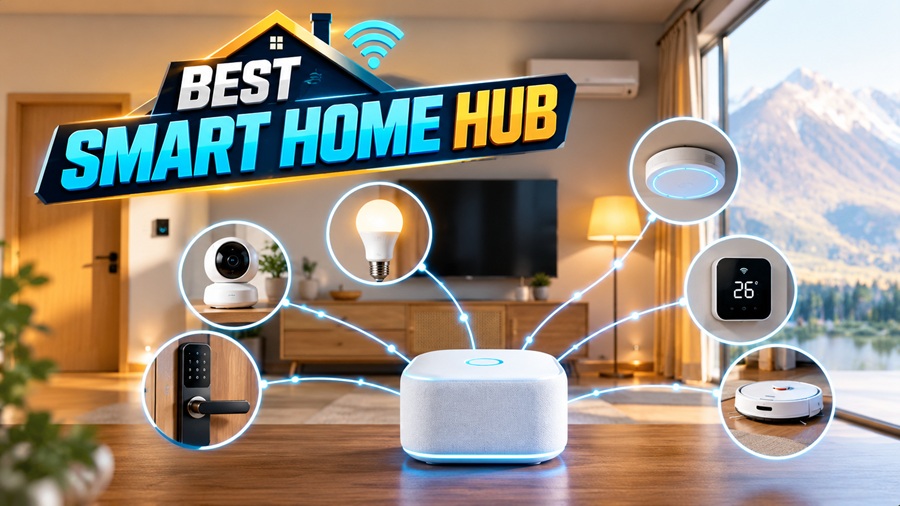


A smart home should make everyday tasks easier, not leave you juggling six apps to turn off the lights. A hub or controller can bring compatible devices together, allowing them to respond to schedules, sensors, and each other.
But choosing one isn’t simply about finding the longest feature list. The best smart home hub for your household depends on the devices you own, the routines you want, and how much setup you’re comfortable managing.
Here’s how to compare your options without getting lost in technical terminology.
What Does a Smart Home Hub Do?
A hub coordinates compatible devices and provides a central place to manage them. Depending on its capabilities, it may connect directly to sensors, communicate with another manufacturer’s bridge, or use online services to control devices.
For example, a door sensor could trigger a hallway light after sunset. A bedtime routine could turn off selected lights, adjust the thermostat, and check whether doors are locked.
The terminology can be confusing:
- Controller: Manages devices and automations.
- Hub: Often combines controller functions with radios for different device networks.
- Bridge: Connects devices from one system or protocol to another.
One product may perform several of these roles. The important question is what it actually supports, not what the packaging calls it.
Do You Need a Separate Hub?
Not every smart home needs a dedicated box.
A few Wi-Fi lights or plugs may work perfectly well through their manufacturer’s app. Some smart speakers, displays, routers, and other household devices already include controller or hub functions.
A dedicated hub becomes more useful when you want several brands to work together, need supported wireless protocols, or want more flexible automation.
Before buying, check what your existing equipment can do. You may already have part of the system you need.
However, “no hub required” does not mean a device works without the internet. It may depend entirely on the manufacturer’s cloud service.
Understand the Main Standards and Protocols
Compatibility becomes easier to assess when you separate device communication from platform features.
| Technology | What it does | What to check |
| Wi-Fi | Connects devices to your home network | Platform support and cloud dependence |
| Zigbee | Provides a low-power mesh network | Compatible hub radio and exact device support |
| Z-Wave | Provides another low-power mesh network | Hub support and regional radio compatibility |
| Thread | Provides an IP-based low-power mesh network | Availability of a compatible border router |
| Matter | Standardizes communication for supported smart-home functions | Controller support, device type, and available features |
| Bluetooth | Supports nearby communication and often setup | Whether ongoing operation needs additional equipment |
Matter and Thread are not interchangeable. Matter is an application-layer standard, while Thread is a networking technology.
Matter devices commonly communicate over Wi-Fi, Ethernet, or Thread. A Matter-over-Thread device needs an accessible Thread border router as well as a compatible Matter controller. Those functions may be built into the same product—or provided separately.
Check Exact Device Compatibility
Start with a list of your current devices, including model numbers. Add anything you expect to buy soon, such as blinds, leak sensors, thermostats, or locks.
Then check the hub’s official compatibility information. Brand-level claims are not enough: two products from the same company may use different protocols or expose different functions.
Confirm the features you actually need. Basic on/off control does not necessarily include energy monitoring, advanced thermostat settings, or camera recordings.
Matter can improve interoperability, but it does not guarantee every platform offers every feature. Manufacturer-specific functions may still require the original app.
Also check whether older devices need a bridge. A hub supporting Matter will not automatically connect directly to an existing Zigbee accessory.
Decide What Must Work Without Internet
Local automation can make a smart home more resilient, but “local control” needs careful examination.
A routine may run locally only when its trigger, conditions, and actions all use supported local devices. Adding one cloud-dependent service can introduce an internet requirement.
Ask what happens during an outage:
- Can sensors still trigger lights?
- Can schedules continue?
- Does the phone app work on the home network?
- Do voice commands need the cloud?
- Is remote access unavailable?
Internet resilience is also different from power resilience. Local routines still need the controller, relevant networking equipment, and connected devices to remain powered.
Keep practical manual controls available, especially for lighting, locks, and heating. Automation should complement—not replace—appropriate safety systems.
Choose Automation Features You Will Use
Think about a few useful routines before comparing advanced features.
You might want lights to turn on when someone enters a room, a notification when water is detected, or blinds to close during strong afternoon sunlight.
Look for understandable triggers, conditions, schedules, and actions. Useful extras include delays, device groups, household presence, and exceptions.
For example, a motion-triggered light should perhaps operate only after dark and stay off during a movie.
Check whether the app explains why a routine did or didn’t run. Event history and troubleshooting tools can save considerable frustration.
More complexity isn’t always better. A system that requires constant adjustment may undermine the convenience you wanted.
Plan for Reliable Connectivity
A capable hub cannot compensate for weak coverage or poor placement.
Position it according to the manufacturer’s guidance, away from unnecessary obstructions and interference. If Ethernet is available and supported, a wired connection can remove one wireless dependency.
Mesh networks also need appropriate coverage. Many mains-powered Zigbee or Thread devices can extend their respective networks, while battery-powered sensors generally do not. Check individual device behavior rather than assuming every product acts as a repeater.
Separate protocols do not automatically strengthen one another’s mesh.
For larger homes, plan coverage before purchasing dozens of devices. Adding accessories gradually makes connection problems easier to identify.
Review Security, Privacy, and Support
A controller may manage door locks, occupancy information, and other sensitive functions. Treat security as a buying criterion rather than an afterthought.
Look for:
- Ongoing security updates.
- Clear support and end-of-life policies.
- Strong account protection, including multifactor authentication where available.
- Separate household accounts and permissions.
- Understandable data collection and deletion policies.
- Backup and recovery options.
Keep software current and remove access for people who no longer need it. Avoid exposing the controller directly to the internet through improvised port forwarding.
Local operation can reduce some cloud dependence, but it does not automatically make a system secure. Maintenance and configuration still matter.
Compare the Full Cost and Daily Experience
The purchase price may be only part of the expense. Additional radios, bridges, subscriptions, remote-access services, or replacement accessories can increase the total.
Consider usability for everyone in the home. Can family members operate devices without learning complicated routines? Can guests still use ordinary switches?
If possible, begin with a small trial: one light, one sensor, and a simple automation. Test setup, response time, outage behavior, and troubleshooting before expanding.
A modest system that works consistently is usually more valuable than a powerful one nobody wants to maintain.
Final Thoughts
The right smart home hub brings your devices together without creating unnecessary work.
Prioritize exact compatibility, dependable automation, understandable controls, and long-term support. Start with a few routines that solve everyday problems, then expand once the system has proved reliable in your home.